Let’s be honest—gaming rooms have come a long way from cluttered corners with tangled cables and mismatched furniture. Today’s gaming spaces rival high-end home offices and luxury lounges, but here’s the secret most people don’t talk about: achieving that premium look doesn’t require a trust fund or a brand partnership. The difference between a setup that screams “budget buy” and one that whispers “custom design” often comes down to strategic choices, not dollar amounts.
Whether you’re building your first dedicated gaming space or refreshing an existing setup, the key lies in understanding which investments deliver the most visual impact. From lighting techniques borrowed from professional studios to furniture hacks that mimic custom millwork, these ten approaches will transform your gaming room into a space that looks professionally designed—without the professional price tag.
The beauty of these strategies? They work equally well in a spare bedroom, a basement corner, or even a thoughtfully carved-out section of a multipurpose room. You’re not just creating a place to play—you’re crafting an environment that elevates your entire gaming experience while looking Instagram-worthy in the process.
Strategic Paint Colors That Create a Premium Atmosphere
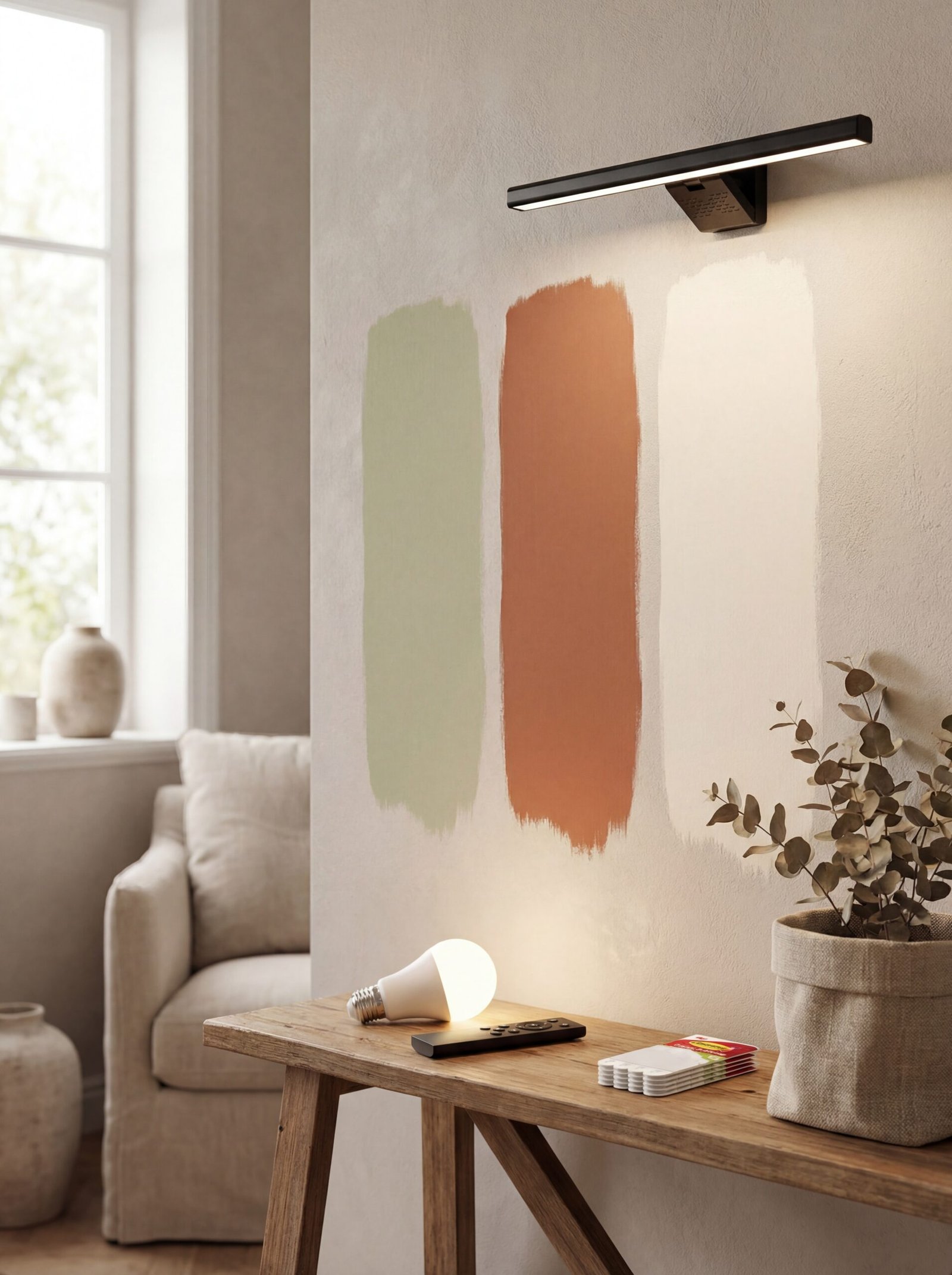
The foundation of any high-end space starts with the walls, and paint remains one of the most cost-effective transformations available. While bright colors might seem exciting initially, sophisticated gaming spaces lean into deeper, more saturated tones that create intimacy and reduce screen glare. Think charcoal grays, midnight blues, or even rich forest greens—colors that provide a neutral backdrop for your RGB lighting while feeling intentionally designed rather than accidentally dark.
The technique matters as much as the color selection. Consider a feature wall behind your main setup in a slightly darker shade than the surrounding walls, creating subtle architectural interest without actual construction. This approach draws the eye to your gaming station as the room’s focal point while maintaining visual flow. The contrast doesn’t need to be dramatic—even a single shade deeper creates depth and dimension.
Matte finishes triumph over glossy alternatives in gaming spaces, preventing unwanted light reflections and creating that sought-after modern aesthetic. Professional designers often choose matte or eggshell finishes for media rooms, and the same principle applies here. The slightly textured surface absorbs rather than bounces light, helping your screens remain the brightest elements in the room.
Enhance your color strategy with smart lighting solutions. The Smart RGB LED Light Bulb offers stepless dimming from warm 2700K to cool 6500K, allowing you to adjust the room’s ambiance based on your gaming mood or content. This flexibility means your paint choice works harmoniously with various lighting scenarios, from focused competitive sessions to relaxed exploration gameplay.
Consider the psychological impact of your color choices. Cooler tones promote concentration and alertness—ideal for competitive gaming—while warmer base colors with adjustable lighting create versatility for different gaming genres. The goal is creating a cohesive environment that supports long gaming sessions without visual fatigue, achieved through thoughtful color selection rather than expensive materials.
Don’t overlook the ceiling—a fifth wall that most people ignore. Painting your ceiling one shade lighter than your walls creates subtle height perception, making smaller spaces feel more expansive. This designer trick costs nothing extra but delivers noticeable spatial impact, particularly in basement or attic gaming setups where ceiling height might be limited.
DIY Cable Management Solutions That Elevate Your Space
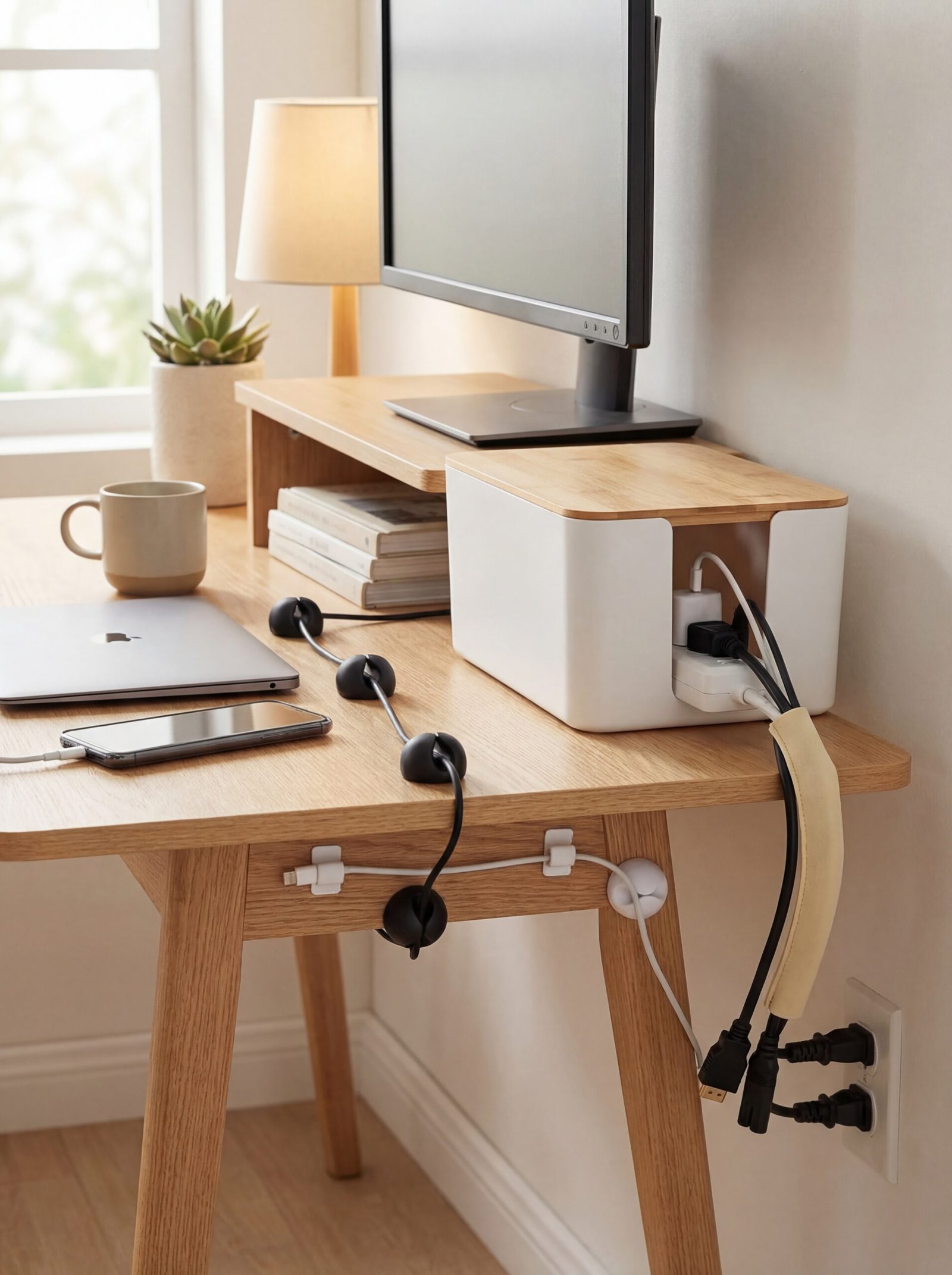
Nothing undermines an expensive-looking setup faster than a tangle of visible cables. Professional installations always prioritize cable management, and achieving that clean aesthetic costs far less than you’d expect. The difference between a $500 setup and a $5,000 setup often comes down to how thoughtfully the cables are concealed and organized, not the equipment itself.
Start with the Cord Holder Cable Clips—these adhesive organizers keep individual cables exactly where you want them, preventing the dreaded cable drift that creates visual clutter. Position them strategically along desk edges, behind monitor stands, and along wall baseboards to create invisible pathways for your wiring. The key is planning your cable routes before adhering clips, ensuring the most direct and hidden paths possible.
For power strips and cable clusters, the Cable Management Box offers an elegant solution that completely conceals messy power strips while providing organized access. The wooden-style finish integrates seamlessly with modern gaming furniture, transforming what would be an eyesore into a deliberate design element. Position it behind your desk or mount it underneath for complete invisibility.
The JOTO Cable Management Sleeve addresses the challenge of multiple cables running to the same destination—such as from your PC to your desk peripherals. These zippered sleeves bundle cables into a single, flexible channel that can be routed along furniture legs or behind desks. The beige color blends with most wood tones, while the flexible design accommodates adding or removing cables without complete disassembly.
Consider vertical cable runs rather than horizontal ones wherever possible. Cables running vertically along furniture legs or walls register as intentional design lines rather than messy afterthoughts. This simple orientation change dramatically impacts how organized your space appears, even when cables remain partially visible.
Create a maintenance routine for your cable management system. Even the best organization degrades over time as equipment gets added or rearranged. Schedule a quarterly cable audit to restore your system to its original pristine condition, removing unused cables and reorganizing new additions. This ongoing maintenance preserves your room’s premium appearance without requiring constant attention.
Label your cables at both ends using subtle, matching tags. This practical step prevents future frustration when troubleshooting or upgrading equipment, and demonstrates the kind of attention to detail that separates amateur setups from professional installations. Small touches like labeled cables signal a thoughtfully designed space rather than a hastily assembled one.
Transform Your Walls with Affordable LED Strip Lighting
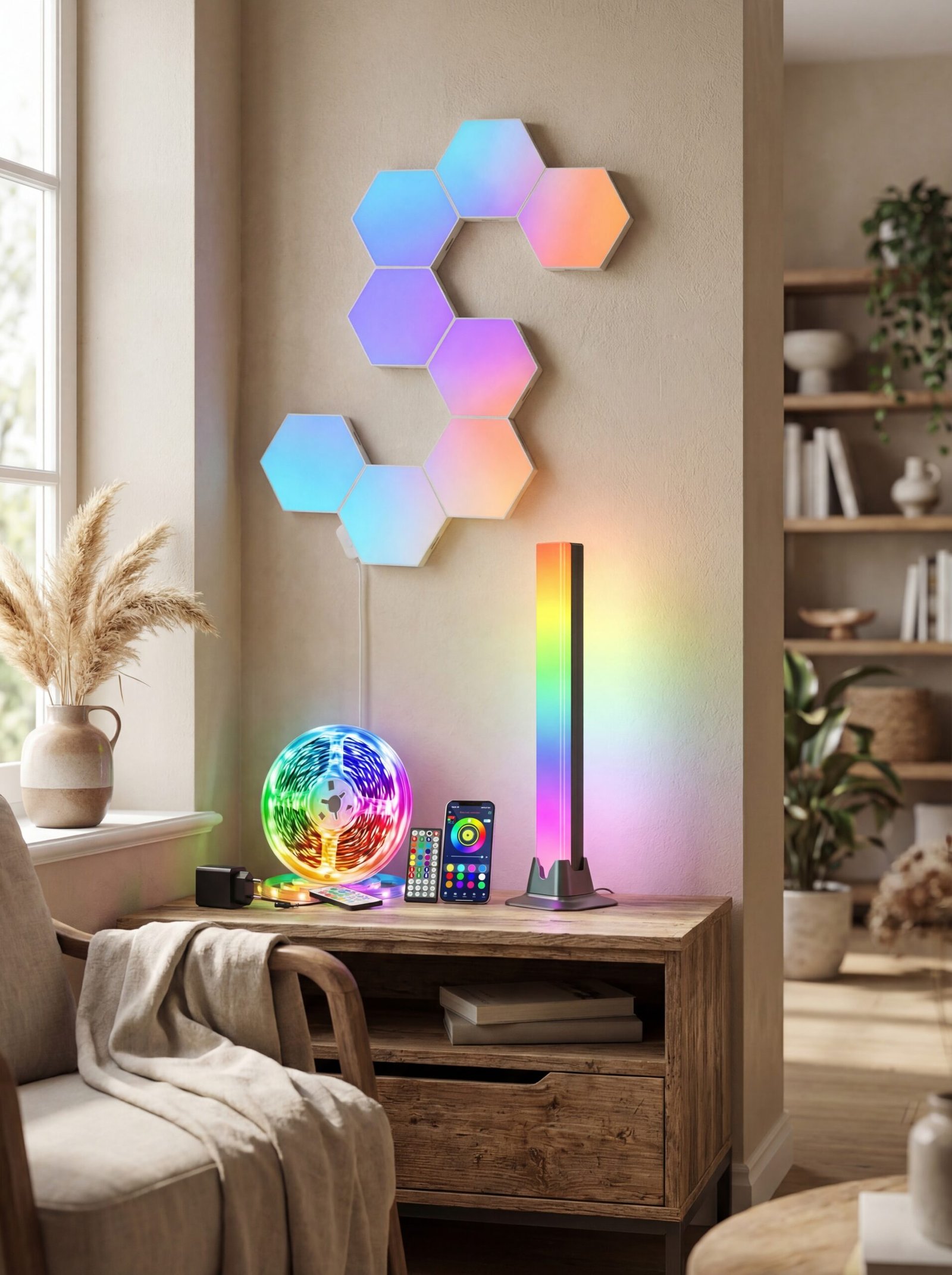
Architectural lighting transforms any space from basic to breathtaking, and LED strip lighting offers this transformation at a fraction of traditional lighting installation costs. The strategic placement of LED strips creates indirect lighting effects that professional designers use in million-dollar homes, achievable in your gaming room for under a hundred dollars.
The LED Strip 10m with Remote Control & App provides comprehensive coverage for medium to large gaming rooms, with music sync capabilities that respond to your gameplay audio. Install strips along the top edge of walls where they meet the ceiling, creating a soft wash of color that highlights your room’s architecture while providing ambient lighting that reduces eye strain during long gaming sessions.
Geometric lighting installations create striking focal points without requiring expensive neon signs or commissioned art. The Hexagon Lights for Wall offer modular design possibilities, allowing you to create custom patterns that reflect your personal aesthetic. Arrange them in symmetric patterns behind your gaming station or create asymmetric compositions on side walls—the flexibility ensures your design remains unique to your space.
Consider the Ustellar RGB Light Bar for more concentrated lighting effects. These bars work exceptionally well flanking monitors or creating vertical accent lines along furniture edges. The compact design delivers powerful illumination in targeted areas, perfect for highlighting specific design elements or creating balanced lighting on either side of your main setup.
Layer your lighting effects rather than relying on a single source. Combine ceiling-mounted strips with lower wall accents and desk-level lighting to create depth and dimension. This multi-level approach mimics professional lighting design, where illumination comes from multiple directions and heights to eliminate harsh shadows while creating visual interest.
Synchronize your lighting with your gaming content for an immersive experience that impresses visitors. Most modern LED systems offer screen-matching modes that adjust colors based on displayed content, creating an expanded visual field that extends beyond your monitors. This feature transforms movie watching and cinematic gaming into truly enveloping experiences.
Don’t forget about color temperature strategy. While RGB capabilities offer endless creative possibilities, sophisticated spaces often rely on carefully chosen static colors or gentle color transitions rather than rapid rainbow cycling. Establish signature color schemes for different activities—perhaps cool blues for competitive gaming, warm ambers for casual sessions, and neutral whites for work or study purposes.
Thrifted Furniture Hacks for a Custom Gaming Setup
The furniture you choose defines your gaming room’s overall aesthetic, but custom or designer gaming furniture commands premium prices that balloon quickly. The alternative? Strategic furniture hacking that transforms affordable pieces into custom-looking solutions perfectly tailored to gaming needs. This approach requires vision rather than wealth, seeing potential in pieces others overlook.
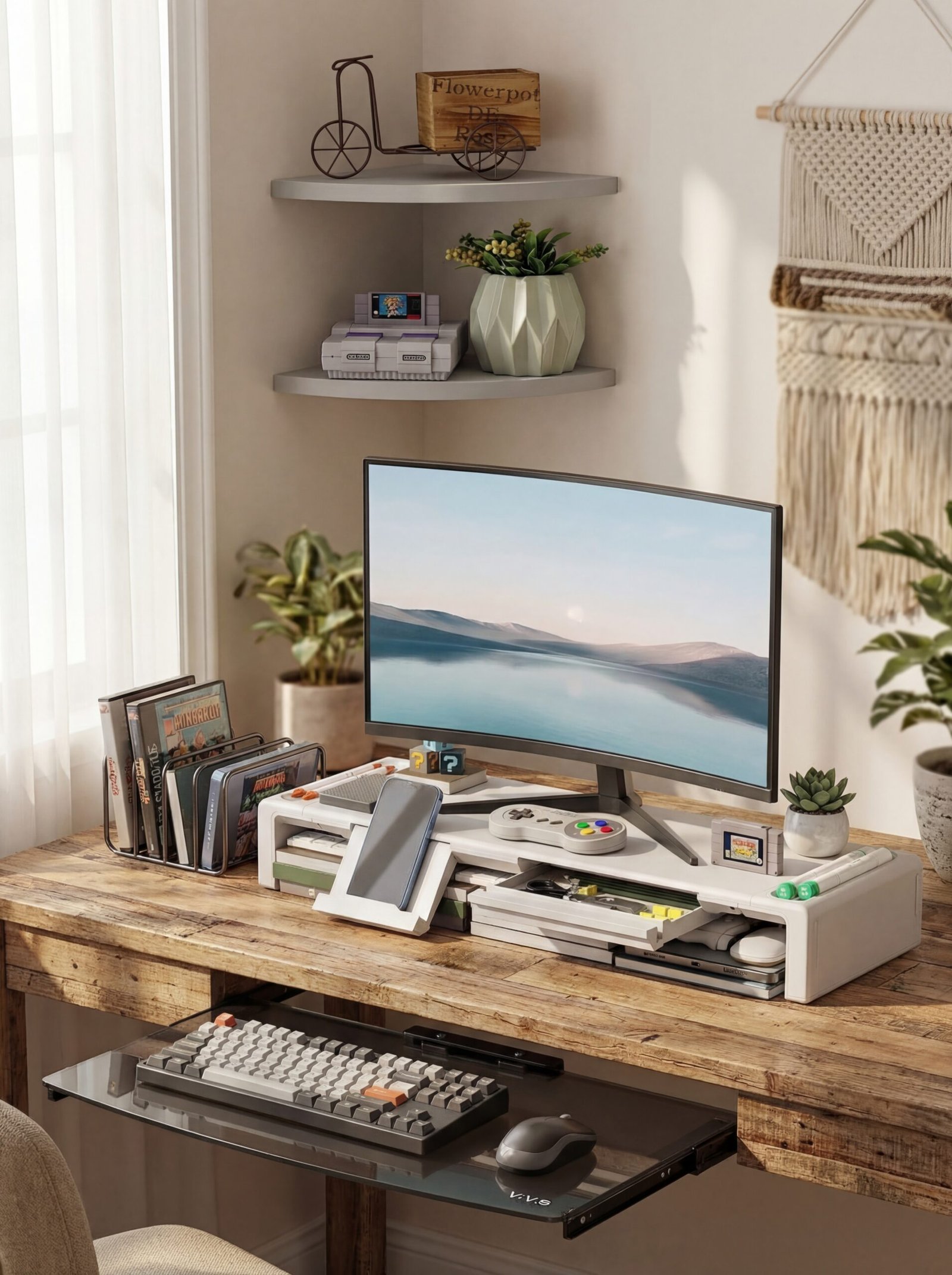
Elevate any standard desk with the Monitor Stand Riser, which creates the appearance of built-in monitor housing while adding valuable storage. The clean white finish integrates with modern minimalist aesthetics, while the foldable design allows you to adjust ergonomics—a feature even expensive gaming desks often lack. The integrated drawer and pen slots transform your desk surface into an organized command center.
Wall-mounted solutions maximize floor space while creating that floating, contemporary look associated with high-end design. The VIVO Floating Wall Mount Tempered Glass Shelf provides a sleek platform for gaming consoles, audio equipment, or decorative elements. These floating shelves create visual lightness and make even compact spaces feel more expansive, as wall-mounted elements draw the eye upward rather than emphasizing floor-level clutter.
Corner spaces often become wasted dead zones in gaming setups, but the Corner Wall Shelves with Cable Raceway transform awkward angles into functional design features. The integrated cable management means your corner shelving looks intentionally designed rather than retrofitted, with clean lines that complement your overall aesthetic. Use these for displaying collectibles, housing streaming equipment, or creating accessible storage for frequently used peripherals.
When sourcing thrifted furniture, prioritize solid construction over surface finish. Sturdy wood pieces accept paint, stain, or laminate overlays far better than particle board alternatives. A well-built desk with scratched veneer costs a fraction of new furniture but accepts surface treatments that completely transform its appearance. Sand, prime, and paint in your chosen color scheme for a cohesive look that appears custom-made.
Consider functionality modifications that enhance gaming-specific needs. Standard desks rarely include features like headphone hooks, controller charging stations, or cable pass-throughs, but these additions cost minimal amounts to implement yourself. A few strategically placed hooks, a wireless charging pad, and drilled cable holes transform generic furniture into purpose-built gaming furniture.
Mix furniture eras and styles deliberately rather than accidentally. A mid-century modern desk paired with industrial shelving and contemporary lighting creates an eclectic-yet-intentional aesthetic that suggests curation rather than budget limitation. This mixing demonstrates design confidence and creates spaces with personality that identical furniture sets simply cannot achieve.
Repurpose Everyday Items into High-End Gaming Décor
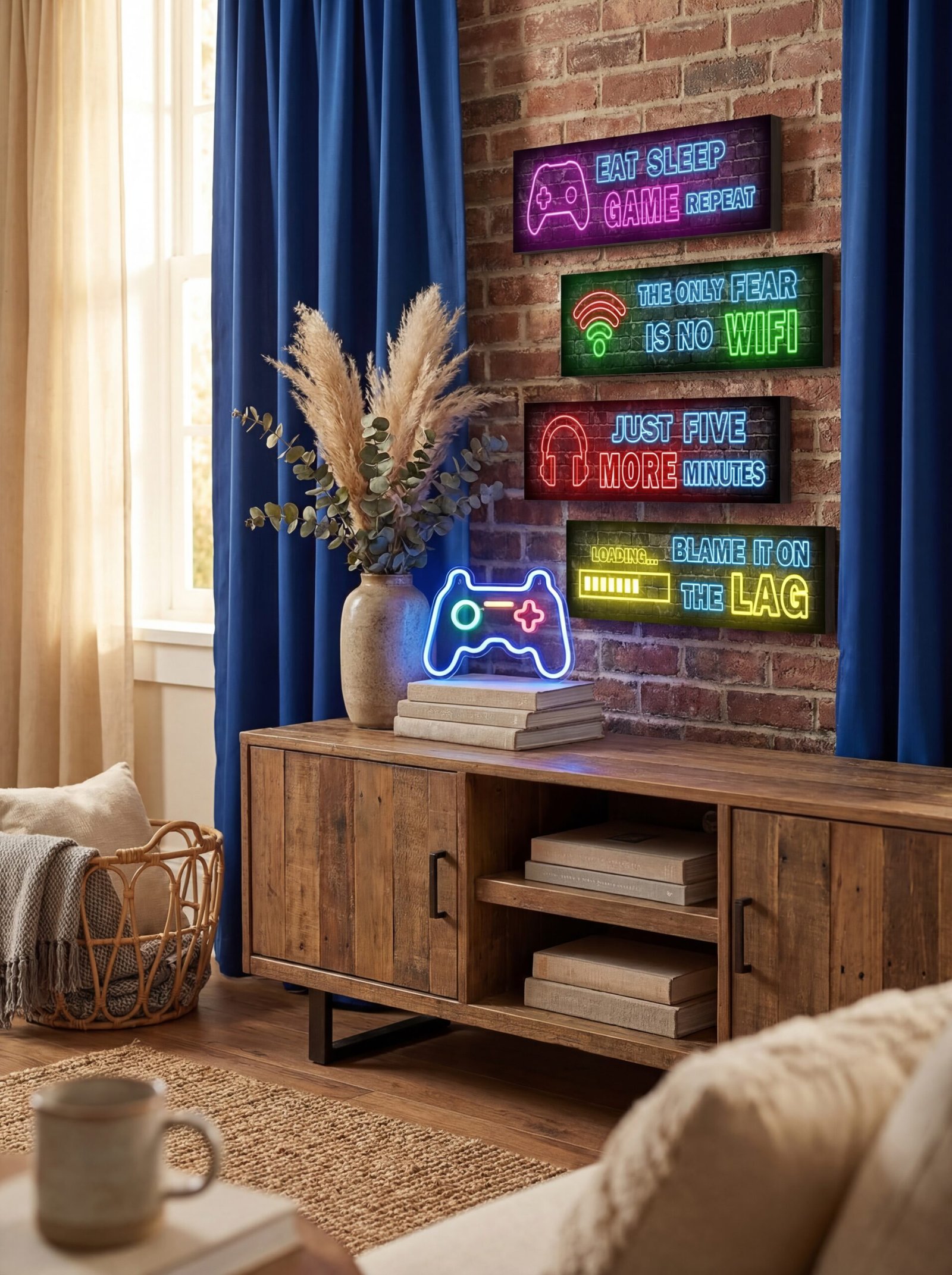
Décor separates functional spaces from designed environments, but gaming-specific wall art and accessories often carry inflated price tags that strain budgets. The solution lies in creative repurposing and strategic selection of affordable pieces that deliver maximum visual impact. Your walls and surfaces deserve the same attention as your equipment, completing the premium aesthetic you’re building.
Gallery walls work exceptionally well in gaming spaces, but skip expensive framed posters in favor of the 4 Pcs Printed Neon Gaming Posters. These wooden prints deliver sophisticated visual appeal with gaming-relevant imagery that doesn’t scream “teenager’s bedroom.” Arrange them in a grid for modern symmetry or stagger them for dynamic energy—either approach creates a deliberate focal point that anchors your space.
Statement lighting pieces double as functional illumination and sculptural art. The LED Game Neon Sign Gamepad Shape provides that coveted neon aesthetic without the expense, fragility, or installation complexity of actual neon. Mount it as a central wall feature or integrate it into a larger gallery arrangement for layered visual interest. The LED technology means it runs cool and efficient, suitable for constant illumination without concerns about heat or energy consumption.
Textile elements soften hard-edged gaming equipment while introducing color and texture. The KOUFALL Loft Bed Curtains might seem like an unconventional choice, but these curtains create defined zones within open gaming rooms, reducing TV glare and creating intimate spaces within larger areas. The blackout properties enhance screen visibility during daytime gaming, while the royal blue color adds sophisticated depth.
Create dimensionality through layered décor rather than relying solely on wall-mounted elements. Utilize desktop space for small sculptural objects, LED displays, or curated collectibles that reflect your gaming interests. The key is selective curation—fewer, well-chosen pieces create more impact than cluttered surfaces covered in random items.
Incorporate natural elements to balance the technological intensity of gaming equipment. A single substantial plant—real or high-quality artificial—introduces organic shapes and colors that prevent spaces from feeling sterile or overly synthetic. Position greenery where it catches light from your LED installations for dramatic shadowing effects that add depth to your room.
Use unexpected items as organizational solutions that double as décor. Vintage toolboxes become controller storage, industrial pipe fittings transform into monitor stands, and restaurant supply store items provide unique storage solutions at fraction of retail gaming accessory costs. This approach creates conversation-starting spaces with personality that cookie-cutter gaming rooms lack entirely.
Smart Storage Solutions That Double as Design Features

Clutter destroys premium aesthetics faster than any other single factor, but conventional storage solutions often appear utilitarian rather than designed. The challenge lies in finding storage that organizes your gaming accessories while contributing to rather than detracting from your room’s visual appeal. Thoughtful storage transforms practical necessity into deliberate design choice.
The Keepo Pegboard Combination Kit revolutionizes vertical storage by turning walls into functional organizational systems. The modular design allows you to customize your storage layout as your needs evolve, accommodating new controllers, headsets, or accessories without requiring additional purchases. The clean white aesthetic reads as contemporary design rather than workshop storage, particularly when integrated with your overall color scheme.
Corner spaces benefit from the VIVO Corner Clamp-on 2-Tier Shelving Unit, which claims typically unused space while maintaining desk surface real estate. The clamp-on design means no permanent modifications to furniture, ideal for rental situations or evolving setups. Use upper tiers for display purposes—collectibles, plants, or ambient lighting—while lower tiers handle functional items like external drives, charging stations, or frequently accessed games.
Underutilized under-desk space becomes valuable storage with the 4 Pack Adhesive Under Desk Hanging Shelf Mount Drawer Organizer. These attachable trays keep cables, adapters, and small accessories accessible yet invisible, maintaining clean desktop surfaces essential to premium aesthetics. The adhesive mounting requires no tools while providing secure attachment that handles daily use without sagging or detaching.
Create zones within your gaming room using storage to define areas. Separate zones for competitive gaming, casual play, streaming, and work/study prevents visual chaos while maintaining functional flexibility. Each zone’s storage should reflect its primary purpose—streaming zones need accessible cameras and microphones, while competitive gaming zones prioritize controller charging and quick-swap peripherals.
Implement the “one in, one out” rule for gaming collectibles and accessories. As your collection grows, designate storage for active items while rotating less-used pieces out of sight. This discipline prevents clutter accumulation while keeping your space feeling curated rather than cluttered. Closed storage solutions hide these rotated items without requiring you to permanently part with sentimental pieces.
Color-coordinate your storage solutions with your overall room palette. Whether that means white organizers against white walls for seamless integration or contrasting black storage against lighter backgrounds for architectural definition, intentional color choices elevate storage from afterthought to design element. This coordination demonstrates design thinking that separates amateur spaces from professionally conceived rooms.
Lighting Layering Techniques on a Shoestring Budget

Professional interior designers never rely on a single overhead light, instead building layers of illumination that serve different purposes and create dimensional spaces. This same principle transforms gaming rooms from flat, one-note environments into dynamic spaces that adjust to different activities and moods. Layered lighting doesn’t require expensive fixtures—just thoughtful placement of affordable sources.
Task lighting addresses specific functional needs, and the New bee RGB Headphone Stand elegantly combines storage with illumination. The seven light modes provide ambient glow during gaming sessions while the USB charging ports add practical functionality. Position this near your primary seating area where it provides subtle personal lighting without creating screen glare—perfect for late-night sessions when overhead lighting feels too harsh.
Peripheral lighting reduces eye strain while creating atmosphere, and the Large RGB Gaming Mouse Pad delivers illumination from an unexpected source. The 15 light modes allow customization from subtle accent to dramatic statement, with the practical benefit of defining your primary interaction space. The extended size accommodates both keyboard and mouse, creating a cohesive lit zone that frames your desk setup.
Accent lighting highlights architectural features or design elements you want to emphasize. Consider placing the Headphone Stand Wall Mount where it catches and reflects light from other sources, creating interplay between different lighting layers. The foldable design means you can adjust positioning as your lighting scheme evolves, maintaining flexibility as your space develops.
Establish lighting scenes for different activities rather than relying on a single all-purpose setting. Competitive gaming might require focused task lighting with minimal ambient distraction, while casual exploration games benefit from colored ambient lighting that enhances immersion. Streaming sessions need flattering face lighting that differs entirely from private gaming lighting. Creating these distinct scenes requires only the ability to adjust existing lights differently—no additional hardware necessary.
Consider natural light integration during daytime hours. Position desks perpendicular to windows rather than facing them, preventing glare while allowing natural illumination to supplement artificial sources. Window treatments should provide light control without complete blackout—translucent curtains or adjustable blinds offer flexibility throughout the day as natural light angles shift.
Don’t overlook the dramatic potential of backlighting. Position LED strips behind monitors, furniture, or artwork to create floating effects that add sophistication and depth. This indirect illumination technique—used extensively in luxury hotels and high-end restaurants—costs pennies but delivers premium visual results that transform how your space is perceived and experienced.
Fabric and Textile Upgrades for a Luxury Feel
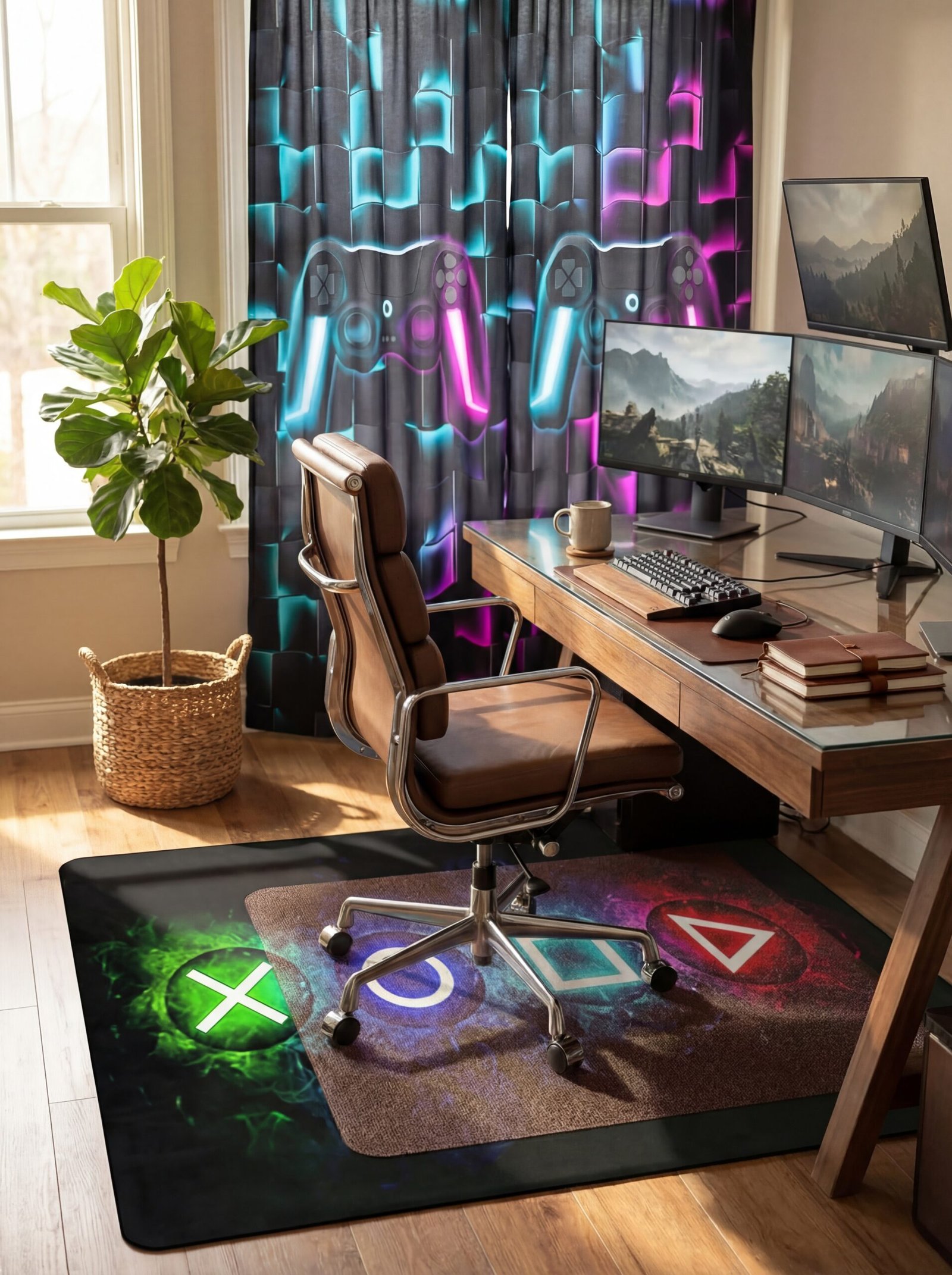
Hard surfaces dominate most gaming setups—wood, metal, glass, plastic—creating acoustically harsh environments that feel cold despite RGB warming. Introducing textiles balances these hard elements while adding acoustic dampening that improves both sound quality and comfort. The right fabric choices elevate spaces from utilitarian to luxurious, a transformation that costs surprisingly little.
Anchor your space with the Games Area Rugs, which defines your gaming zone while introducing pattern and texture. The gaming-specific design feels intentional rather than generic, while the soft surface provides comfort during long sessions. Area rugs also protect flooring from chair wear while reducing sound transmission—particularly valuable in apartments or shared living situations where noise consideration matters.
Window treatments dramatically impact room aesthetics and functionality. The Erosebridal Gamer Curtains offer 50% light blocking that reduces glare without complete darkness, maintaining natural light benefits during daytime gaming. The teal and purple color scheme introduces sophisticated color without overwhelming the space, while the gaming controller pattern adds thematic relevance without juvenile aesthetics.
Floor protection becomes essential with gaming chairs’ constant movement, and the ATOKA Chair Mat provides this protection with style. The 4mm thickness absorbs sound while protecting floors from scratches and dents, particularly important for hardwood or laminate surfaces. The clear design maintains visual continuity with your flooring rather than introducing another color or pattern that might conflict with your carefully planned aesthetic.
Layer textiles for dimensional interest—a chair mat under an area rug creates subtle texture variation while providing complete floor protection. This layering technique mirrors high-end interior design where multiple textile layers create richness and depth. The practical benefit is comprehensive protection; the aesthetic benefit is sophisticated visual complexity.
Consider acoustic panels disguised as textile art. Fabric-wrapped sound dampening panels come in countless colors and patterns, serving dual purposes as wall décor and acoustic treatment. Position them strategically to manage echo and reverberation—common issues in gaming rooms with hard surfaces—while contributing to rather than detracting from your design scheme.
Don’t neglect seating textiles. If your gaming chair allows for it, add a coordinating throw pillow or blanket that introduces texture and color while providing ergonomic support options for extended sessions. These small touches signal attention to comfort and design that elevates the entire space beyond pure functionality into designed living environment.
Second-Hand Finds That Rival Designer Gaming Furniture
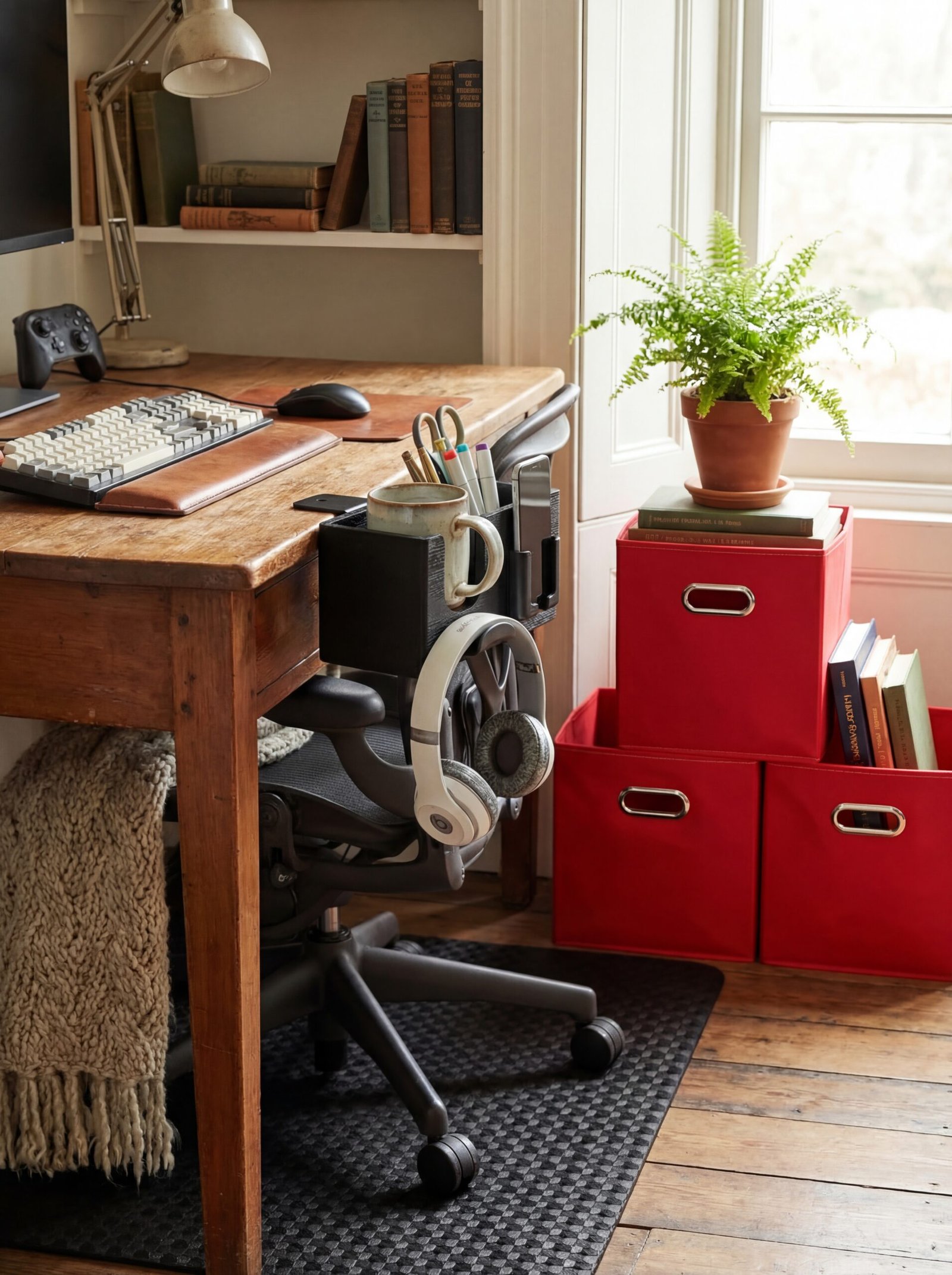
The secondary market offers incredible value for those willing to look beyond retail showrooms, but maximizing these savings requires knowing which items translate well to gaming use and which organizational accessories bridge the gap between generic furniture and purpose-built gaming solutions. Smart accessorizing transforms thrifted furniture into custom-appearing pieces that rival designer alternatives.
Desktop organization makes or breaks any gaming setup’s visual appeal. The 5-in-1 Wooden Desk Organizer consolidates multiple organizational needs into a single elegant solution. The clamp-on design means it works with any desk—thrifted or new—while the multiple compartments for headphones, phone, remote controls, and beverages keep your surface clear and intentional. The black wood finish provides upscale aesthetic that elevates whatever desk it’s paired with.
Storage becomes increasingly important as gaming collections grow, and the Fabric Storage Bins Cubes offer flexible organization that adapts to changing needs. These foldable cubes fit standard shelving units—whether thrifted bookcases or retail systems—creating uniform storage that looks intentional. The handles facilitate easy access, while the fabric construction prevents the industrial appearance of plastic bins.
Floor protection remains essential regardless of furniture source. The Vicwe Office Chair Mat provides hard floor protection with PVC construction that allows smooth chair movement. When you’re building a gaming room on a budget, protecting your existing flooring from damage becomes critical—repairs or replacements can quickly consume your entire budget. This mat provides insurance against wear while maintaining the clean aesthetic required for premium appearance.
When shopping secondhand, prioritize structural integrity over cosmetic condition. Solid wood furniture accepts refinishing that completely transforms appearance—scratches, stains, and dated finishes disappear with proper treatment. Conversely, furniture with structural issues like wobbly joints or warped surfaces rarely justifies the repair effort. Your time investment should go toward cosmetic improvements, not structural repairs.
Look for quality indicators that signal long-term value: dovetail drawer joints, solid wood construction, and smooth-operating hardware. These details indicate furniture built to last, worth the effort of aesthetic updates. Budget your time realistically—a weekend refinishing project transforms a $50 desk into a $500 appearance, but only if you actually complete the project rather than living with half-finished furniture.
Don’t dismiss pieces just because they don’t fit current gaming trends. Mid-century credenzas make exceptional entertainment centers, industrial workbenches create stunning gaming desks, and vintage filing cabinets provide unexpected storage with character. The key is seeing potential rather than current state, recognizing that paint, new hardware, or simple modifications can transform almost any piece into gaming room perfection.
Acoustic Panels You Can Make for Under $50
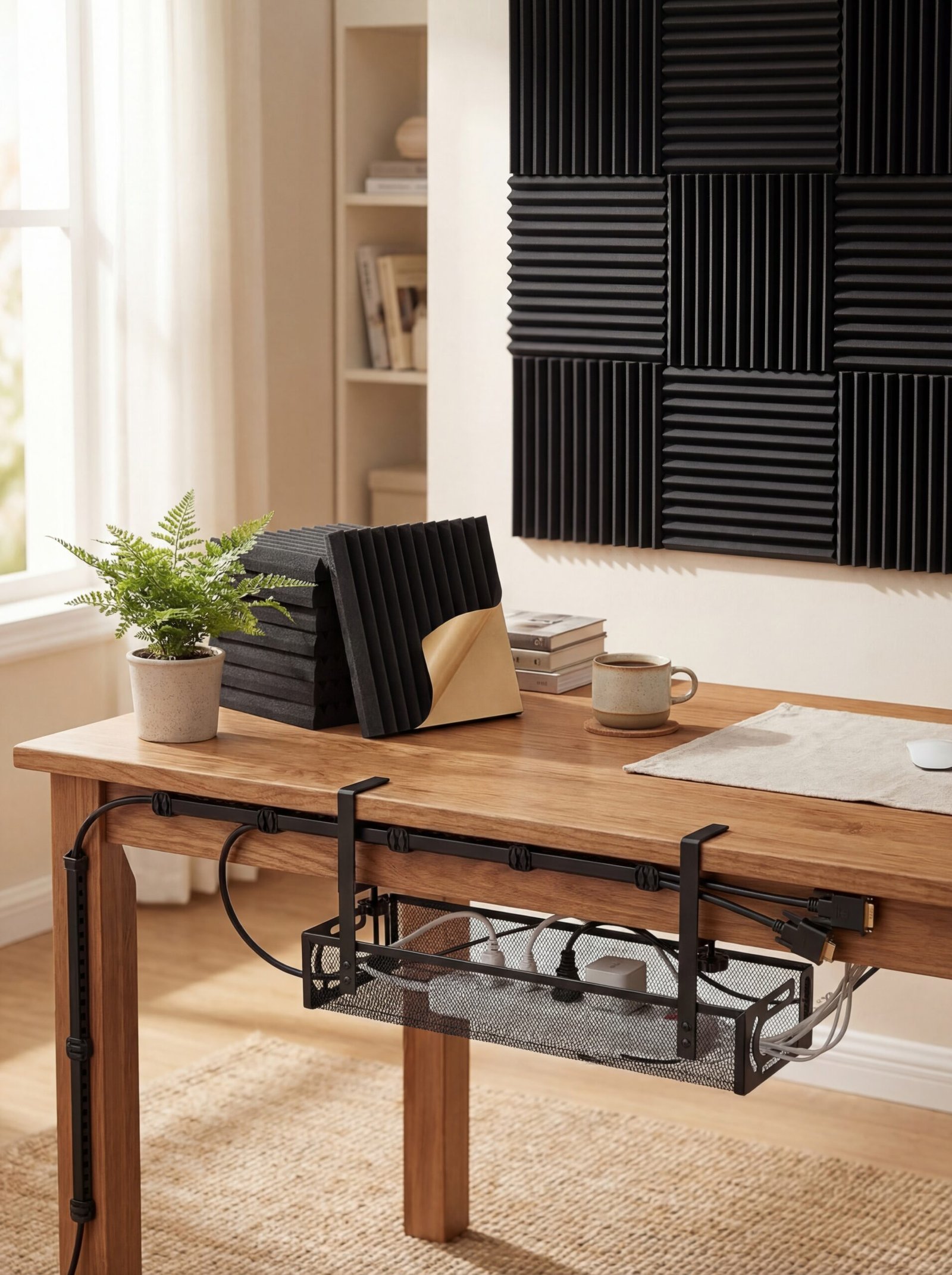
Sound quality matters as much as visual aesthetics in gaming rooms, yet acoustic treatment often gets ignored due to perceived expense or complexity. Professional-quality sound doesn’t require professional installation costs—strategic placement of affordable acoustic materials dramatically improves audio quality while contributing to rather than compromising your room’s design aesthetic.
Start with the 24 Pack Acoustic Panels, which provide comprehensive sound dampening at a fraction of custom acoustic treatment costs. The self-adhesive backing simplifies installation—no special tools or expertise required—while the 1-inch thickness provides meaningful sound absorption. The fire-proofed construction adds safety, particularly important when combined with electronic equipment and LED lighting that generates heat.
Position acoustic panels strategically rather than covering every surface. First reflection points—where sound bounces before reaching your ears—matter most for audio quality. Typically these occur on walls adjacent to your primary speakers and on the wall behind your listening position. Treating these specific areas provides maximum acoustic benefit without requiring complete wall coverage that might feel claustrophobic.
Cable management continues backstage with the Under Desk Cable Management Tray, which organizes the hidden infrastructure that supports your setup. The no-drill clamp design means easy installation and adjustment as your needs evolve, while the metal mesh construction provides durability and ventilation. Proper cable routing prevents accidental disconnections during gaming sessions while maintaining the clean aesthetic you’ve worked to achieve.
Complete your cable concealment strategy with the Updated Cable Raceway Kit. These open-slot wire covers hide cables running along walls or baseboards, creating clean lines that read as architectural details rather than afterthought concealment. The 77-inch total length handles most gaming room perimeters, while the open-slot design allows adding or removing cables without disassembly.
Create acoustic panel patterns that double as wall art. Arrange panels in
